



How do you choose a best Clinic Management Software that aligns with your goals?

Mishal Mussaddique

In 2025, choosing the right Clinic Management Software (CMS) is more important than ever. Whether you’re a solo practitioner or a growing multi-specialty clinic, the right Clinic Management Software can help you streamline workflow, reduce administrative burden, and enhance patient care. Patient expectations are on the rise, data compliance requirements are more stringent and the need for a smart and scalable solution that aligns with a clincs operational goals in more important than ever.
But with so many options on the market, how do you choose the right one?
This blog discusses the importance of choosing the right clinic management software, key features to look out for and the most essential steps involved in choosing the perfect solution to address your clinic’s evolving needs. Also, don’t forget to check out how and why Dochours could be the right choice for your clinic.
What is a clinic management software?
A clinic management software (CMS) is an online tool that facilitates the smooth everyday functioning of healthcare clinics. It simplifies different tasks like patient registration, appointment scheduling, billing, and managing medical records by reducing the work. This makes it easier for clinics to handle administrative work and improve patient care. A clinic management software is designed to save time and effort on routine tasks, letting healthcare providers spend more time with patients. It also keeps all data secure and easy to access.
In addition to simplifying operations, clinic management software often includes features like inventory management, reporting, and analytics, helping clinics track their resources and make data-driven decisions. These tools help clinics track their resources and make informed decisions based on data. By improving data accuracy and reducing errors, clinic management software enhances workflow efficiency. This not only increases productivity but also leads to a better experience for patients.
Why choosing the right CMS matters in 2025
Focus on patients
The main purpose of running a clinic is to provide quick and timely patient care. However, being overwhelmed by administrative tasks can hinder this objective. Adopting a clinic management software, allows you to automate and streamline several important tasks such as managing appointments, notifying your patients and streamlining OP flow. This means you can focus on what truly matters – patient care.
Make use of Data
With clinic management software in place, crucial patient data isn’t lost but instead utilized to help make better decisions that drive better patient care. Features such as built-in analytics can give you insights about appointment trends, revenue and operational bottlenecks.
Reduce Errors
Clinics manage a vast amount of sensitive data every day, and they cannot afford any errors in handling it. Manual data handling is likely to lead to mistakes. Using outdated methods for managing appointments and storing patient information poses significant risks, including data loss and inaccuracies. By using clinic management software, you can ensure that your data remains secure and protected.
Save Time on Repetitive Tasks
Clinic management software typically includes features like automated reminders, invoice generation, and prescription templates, which free up doctors and staff from repetitive tasks. This leads to faster process flow and improved patient care.
Maintain Accurate Billing and Inventory
Clinic management software helps you manage billing, appointments, patient summaries, and test reports. This software ensures accuracy, reduces discrepancies, and minimizes revenue loss. Providing a real-time overview of your clinic’s operations helps reduce errors, eliminate confusion, and support better decision-making. As a result, you can spend less time addressing mistakes and more time focusing on your patients.
Key features to look for in a 2025-ready clinic management software
Appointment Management
One of the primary purposes of a clinic management software is to streamline appointments and facilitate faster and easier bookings. The software that you choose must have a patient booking portal that allows patients to make appointments online, along with real-time slot availability. Patients should also receive auto-reminders through SMS/WhatsApp so as to ensure that the patient doesn’t miss any appointments.
OP flow management
For clinics, the software must support smooth queue and doctor availability management. The check-in status of each patient should be easily accessible and updated in real time to help manage the OP flow efficiently. If your clinic uses a token management system, the software should integrate with it seamlessly.
Digital Patient Records

A patient’s interaction with the clinic often involves multiple follow-ups. Having ready access to patient history and previous appointments is crucial to ensure continuity of treatment. A clinic management software digitizes patient records and allows easy search and retrieval of the entire visit and treatment history at any time. This means patients don’t have to carry physical documents every time, and doctors can access all past data in one place without hassle.
Billing and invoicing
A good clinic management software automatically generates bills after each appointment based on the consultation fee and any additional services provided. This reduces manual errors. Look for software that allows you to customize charges, apply taxes automatically, and track pending payments. It gives you a clearer view of your finances and helps you stay organized.
Cloud-based solution
This is often a grey area, as many clinics still rely on on-premise systems due to the misconception that cloud storage is unsafe. But legacy systems come with limitations that can affect long-term patient care. In fact, data stored in legacy systems is rarely secure, and the burden of protection falls entirely on the clinic. Opting for a cloud-based system that meets data security standards means you’re safeguarding your data while letting your provider handle the technical side, allowing you to focus on patient care.
Detailed analytics
An analytics dashboard that provides actionable insights about the clinic’s functioning is essential. It should include features like appointment trends (such as busy hours/days), revenue breakdown, performance of doctors, and other indicators to help you identify bottlenecks and improve operations.
Data compliance
Your clinic management software should comply with HIPAA and other relevant data security standards to ensure full protection of sensitive patient information. This is crucial for building trust and maintaining confidentiality.
Multi-branch and multi-user support
If you run more than one clinic or have a large team, multi-branch and multi-user support is a must. It lets you manage all your branches from a single dashboard without switching between systems. You can assign specific roles like Doctor, Receptionist, or Admin, and control who can access what. This will allow you to keep track of all activities in one place and ensures that everything stays organized across the different locations.
A user-friendly UI
It’s not just about the number of features—how easily they can be used matters just as much. Doctors and clinic staff shouldn’t spend time figuring out how to use the system. A good clinic management software should have an intuitive design with a short learning curve so that the focus remains on patient care.
Role-based access for employees
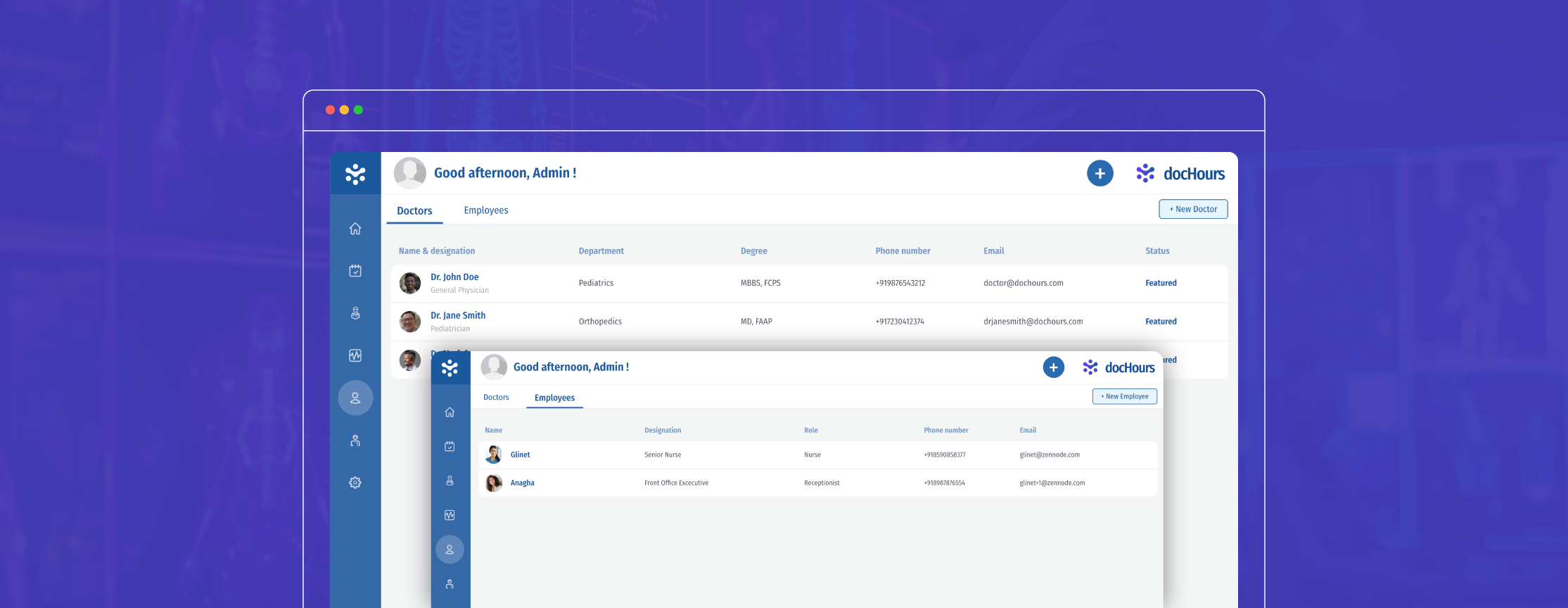
Apart from protecting data from external threats, it is essential to safeguard data within your clinic. Enabling tiered access to data based on a particular user’s role ensures that users only have access to information that is essential for them to fulfil their duties. This will prevent data misuse and restrict unauthorized access to sensitive patient information.
Dedicated Support
Customer service is one of the most overlooked factors when purchasing a clinic management system. A dedicated support team that offers the best help, even for the tiniest inconveniences, is essential.
Digital footprint
Having a digital footprint is no longer just an option. However, most clinics skip this aspect due to the underlying costs involved. However, clinic management software often provides clinics with a website and customisable themes using which you can showcase your doctors and departments and place your clinic on the web. The website will also include a public booking portal that allows patients to book appointments online.
Scalability
The clinic management software that you choose must scale with your practice, whether you are a single doctor clinic or a polyclinic. The software should grow with your practice without the need for a complete overhaul
Steps to choose a clinic management software
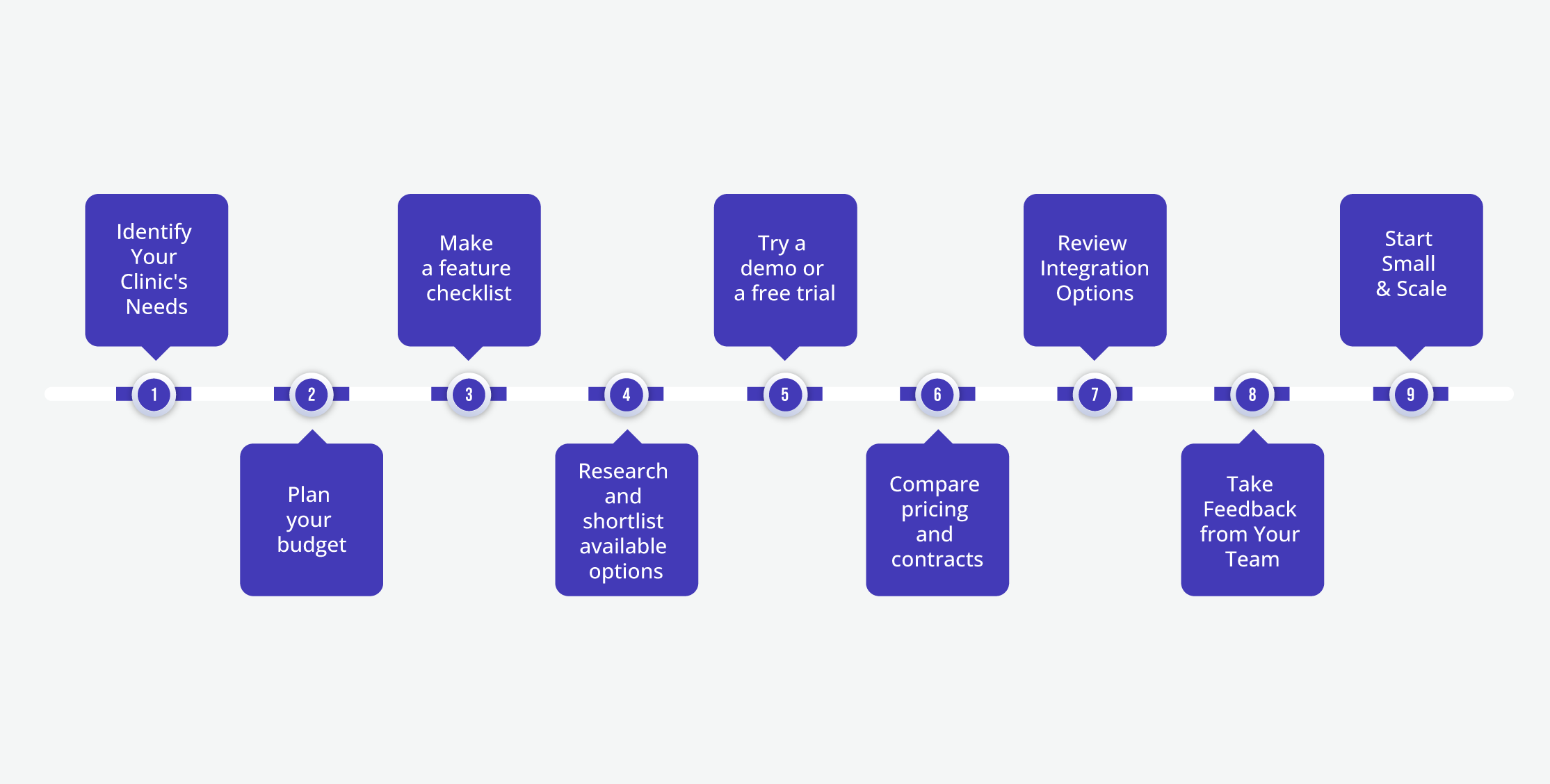
Identify Your Clinic’s Needs
Before choosing clinic management software, it’s important to first identify your clinic’s specific needs. Consider factors such as the size of your clinic (single doctor, multi-specialty, patient volume, etc.), the types of services you offer (including whether you have a lab or pharmacy), and the challenges you want the solution to address (such as paperwork and data silos).
Plan your budget
Once you have a clear understanding of your clinic’s needs, the next step is to evaluate your budget. Determine how much you are willing to invest, taking into account aspects such as setup costs, subscription fees, and scalability. It’s also important to focus on the return on investment (ROI). Implementing a clinic management solution can lead to benefits such as reduced errors, time savings, and an improved patient experience. Ultimately, these improvements can increase patient footfall in your clinic, which in turn will boost your revenue.
Make a feature checklist
When selecting software for your clinic, it’s important to identify the features that are essential for its smooth operation. There are various solutions available, each catering to different needs. Look for features such as appointment scheduling, patient records and electronic medical records (EMR), billing and invoicing, as well as reporting and analytics. These advanced features can directly address your specific challenges and help enhance the efficiency of your clinic.
Research and shortlist available options
Refer to online reviews from trusted sources like Software Advice and Capterra, which compare various clinic management solutions. These platforms provide detailed reviews, feature comparisons, pricing information, and more, helping you identify the option that best suits your needs and saving you hours of manual work. Based on your research, create a shortlist of the solutions that seem to be the best fit for your clinic.
Try a demo or a free trial
Most popular clinic management software options offer either a free demo or a free trial. Taking advantage of these opportunities allows you to explore the user interface, assess ease of use, and evaluate performance. If a free trial is available, be sure to utilize it to see the product in action. This will provide a comprehensive understanding of whether the software is the right fit for you and how it can help address your specific challenges.
Compare pricing and contracts
When comparing the pricing of clinic management software, it’s crucial to understand what each pricing tier includes to ensure you’re getting good value for your investment. Pay close attention to any hidden fees that may not be immediately obvious, such as charges for SMS credits, data migration, or customer support. Choose software that offers flexible monthly or annual plans rather than locking you into rigid long-term contracts. This way, you have the freedom to scale or switch based on your clinic’s evolving needs.
Review Integration Options
Before finalizing your choice of clinic management software, evaluate its capability to integrate with your existing systems, such as laboratories, pharmacies, or payment gateways. Smooth integration can eliminate data silos and minimize manual effort. Additionally, verify whether the software supports popular third-party tools, such as WhatsApp for communication, payment apps for transactions, and accounting software for financial management. This will help ensure smoother workflows and enhance overall clinic efficiency.
Take Feedback from Your Team
It is crucial to involve both the doctors and administrative staff at your clinic in the decision-making process when selecting software. Since they will be using the system on a daily basis, it’s important to prioritize their comfort, ease of use, and feedback. Choosing a tool that meets the needs of the entire team can result in higher adoption rates, fewer errors, and improved coordination in clinic operations.
Start Small & Scale
It’s always a good idea to start with a free trial or a basic version of the software to see how well it meets your clinic’s needs. Starting small allows you to test features, understand the user experience, and evaluate performance in real-world scenarios. Once you’re confident in the system’s value, you can gradually upgrade to more comprehensive plans or add advanced features as your clinic grows.

Conclusion
We’ve discussed the importance of clinic management software and how to identify the right one for you. Clinic management software primarily helps streamline administrative tasks and makes it easier to collect and store information. You can now choose your right fit more easily than ever, as most software now offers a free trial. Remember- a solution that simplifies your tasks, ensures superior patient care and significantly reduces your costs is always a winner.

